
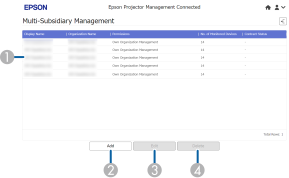
When you select Multi-Subsidiary Management on the Epson Projector Management Connected home screen, the following screen is displayed. You can create subsidiaries and manage them.

Depending on your account type, this screen may not be displayed.
When you log in to Epson Projector Management Connected on a smartphone, this function is not available.
|
|
Add |
Click this button to add an organization as subsidiary. |
|
|
Subsidiary list area |
Displays a list of subsidiaries. When you click
|
|
|
Details area |
Displays detailed information for the selected options. |
|
|
Delete |
Click this button to delete an existing subsidiary setting. |
|
|
Edit |
Click this button to edit an existing subsidiary setting. |
 Related Links

 , detailed information on each subsidiary is displayed.
Click
, detailed information on each subsidiary is displayed.
Click
 to collapse the information.


