
When you select User on the Epson Projector Management Connected home screen, the following screen is displayed. You can display a list of registered users. You can add or delete the users on this screen.

When you log in to Epson Projector Management Connected on a smartphone, this function is not available.
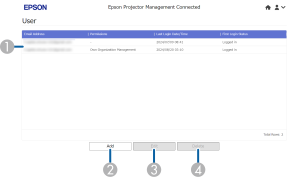
|
|
User list area |
Displays a list of users. |
|
|
Details area |
Displays detailed information for the selected options. Administrators are granted Own Organization Management permissions. |
|
|
Delete |
Click this button to delete an existing user setting. |
|
|
Edit |
Click this button to edit an existing user setting. |
|
|
Add |
Click this button to add a new user setting. |
 Related Links


