
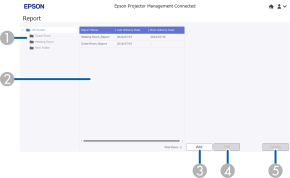
When you select Report on the Epson Projector Management Connected home screen, the following screen is displayed. You can select the report settings to receive information on the usage status of the projector.

When you log in to Epson Projector Management Connected on a smartphone, this function is not available.
|
|
Group view |
Displays the group to which the projectors are registered. Click the group name to display only reports for the selected group. |
|
|
Report list area |
Displays a list of reports. |
|
|
Details area |
Displays detailed information for the selected options. |
|
|
Delete |
Click this button to delete an existing report setting. |
|
|
Edit |
Click this button to edit an existing report setting. |
|
|
Add |
Click this button to create a new report setting. |
 Related Links


